




WooCommerce Attributes: SEO, User Experience, and Conversion Optimization with Dokan Conditional Category Attributes
WooCommerce Attributes.
Note: Digital products mentioned in this page are example use of what we sell a digital software (Dokan Conditional Category Attribute). we do not sell digital products
Table of Contents
- Introduction: Beyond Basic Configuration
- SEO Architecture for Attribute-Rich Marketplaces
- User Experience and Conversion Rate Optimization
- Performance Tuning at Scale
- Enterprise Category Management Strategies
- Integrating with Analytics and Business Intelligence
- Multilingual and Multi-Regional Considerations
- Security and Data Integrity
- Custom Development and API Integration
- Future-Proofing Your Marketplace
1. Introduction: Beyond Basic Configuration
You’ve installed Dokan Conditional Category Attributes. You’ve configured your categories, trained your vendors, and your marketplace is running smoothly. But you’re not here to run a smooth marketplace — you’re here to build a dominant one. This guide is for marketplace operators who want to extract every ounce of competitive advantage from their attribute infrastructure.
The difference between a good marketplace and a great one isn’t just functionality; it’s strategic execution. How you structure your attributes affects your Google rankings. How you present them to customers affects your conversion rates. How you manage them at scale affects your operational costs. And how you integrate them with your broader tech stack affects your ability to compete with industry giants.
This guide covers:
- SEO architectures that turn your attribute data into search engine visibility
- Conversion psychology and how attribute presentation affects buying decisions
- Performance optimization for marketplaces with 10,000+ products and 500+ categories
- Enterprise workflows for managing attribute rules across multiple administrators
- Integration strategies connecting your attribute system to analytics, CRM, and billing platforms
- International expansion techniques for multilingual and multi-currency marketplaces
Whether you’re running a niche software marketplace or aiming to become the next major digital platform, these strategies will help you maximize your return on investment from Dokan Conditional Category Attributes.
2. SEO Architecture for Attribute-Rich Marketplaces, WooCommerce Attributes
Search engine optimization for multi-vendor marketplaces is fundamentally different from optimizing a single-brand store. You don’t control all the content, you can’t ensure perfect keyword density across thousands of vendor listings, and you’re competing with both other marketplaces and individual vendor websites. Your structural advantage is data — and attributes are the most structured data you have.
The Semantic SEO Foundation, WooCommerce Attributes
Google’s algorithms have evolved from keyword matching to semantic understanding. They don’t just look for words on a page; they look for entities, relationships, and structured meaning. Product attributes map perfectly to this semantic model.
When a vendor fills in “License Type: Annual Subscription,” Google understands:
- Entity: Product (Schema.org/Product)
- Property: License Type
- Value: Annual Subscription
- Relationship: This product uses this license model
This semantic richness helps Google match your products to queries like “annual subscription project management software” even if those exact words don’t appear in the product description.
Category Page SEO Optimization, WooCommerce Attributes
Category pages are often the highest-traffic pages on a marketplace. A customer searching “project management software with team collaboration” will likely land on your “Project Management” category page, not an individual product page. The plugin’s frontend filtering enhances these pages significantly.
URL Structure Best Practices:
- Use descriptive URLs:
yoursite.com/product-category/software/project-management/ - Avoid parameter-heavy URLs for filtered states when possible
- Implement canonical tags to prevent duplicate content issues when filters are applied
Meta Description Automation: For category pages, dynamically generate meta descriptions that mention the top attributes available for filtering:
“Browse project management software with team collaboration, Gantt charts, and API access. Filter by deployment type, pricing model, and integrations.”
This signals to Google that your category page is a comprehensive resource, not just a product list.
Attribute-Based Internal Linking
Create internal linking structures that boost SEO authority:
Attribute Archive Pages: If your theme supports it, create archive pages for popular attribute values. For example, a page listing all products with “Deployment: Cloud-Based” across all software categories. This creates powerful thematic clusters that signal topical authority to Google.
Breadcrumb Enhancement: Include attribute context in breadcrumbs when customers filter. Instead of just “Home > Software > Project Management,” show “Home > Software > Project Management > Cloud-Based > Team Size: 50+.” This creates keyword-rich internal links and helps Google understand your site architecture.
Related Products by Attribute: Configure your related products algorithm to consider shared attributes. A customer viewing a “Cloud-Based CRM” should see related products that also have “Deployment: Cloud-Based,” not just products in the same category. This creates attribute-based internal links that reinforce semantic relationships.
Long-Tail Keyword Domination
Long-tail keywords (specific, multi-word search phrases) convert 2.5x better than broad keywords and have 70% less competition. Your attribute system is a long-tail keyword generation engine.
Strategy:
- Identify attribute combinations that represent high-intent searches
- Create optimized landing pages or category filter states for these combinations
- Ensure vendors fill in these attributes accurately
Examples of Long-Tail Opportunities:
- “project management software with Gantt charts for 50 users” → Category: Project Management + Feature: Gantt Charts + Team Size: 50 Users
- “self-hosted analytics platform with real-time dashboards” → Category: Analytics + Deployment: Self-Hosted + Feature: Real-Time Dashboards
- “annual subscription design tool with SVG export and team collaboration” → Category: Design Tools + License Type: Annual + Feature: SVG Export + Feature: Team Collaboration
Monitoring SEO Performance
Note: Digital products mentioned in this page are exemplary use of what we sell a digital software (Dokan Conditional Category Attribute)
Set up tracking to measure the SEO impact of your attribute strategy:
- Google Search Console: Monitor impressions and clicks for category pages. Look for increases after implementing structured attribute filtering.
- Rank Tracking: Use tools like SEMrush or Ahrefs to track rankings for attribute-specific keywords (e.g., “cloud-based CRM with API access”).
- Click-Through Rate (CTR): Compare CTR before and after implementing rich snippets. A well-structured attribute system should increase CTR by 15-30%.
- Organic Traffic to Product Pages: Track whether product pages with complete attributes receive more organic traffic than sparse listings.
3. User Experience and Conversion Rate Optimization
SEO brings visitors to your marketplace. User experience (UX) and conversion rate optimization (CRO) turn those visitors into buyers. The conditional attribute system is a powerful UX tool when leveraged strategically.
The Psychology of Filtered Choice
Barry Schwartz’s “Paradox of Choice” demonstrates that too many options overwhelm customers and reduce conversions. When customers face 50+ filter options, many of which are irrelevant, they experience decision fatigue and abandon their search.
The plugin solves this by showing only relevant filters. But you can go further:
Progressive Disclosure: Don’t show all relevant filters at once. Show the 3-5 most important filters first, with an “Advanced Filters” toggle for the rest. For project management software, show “Price,” “Deployment Type,” and “Team Size” prominently. Hide “API Version,” “Database Support,” and “Compliance Certifications” behind the advanced toggle unless the customer explicitly requests them.
Smart Filter Ordering: Order filters by customer importance, not alphabetically. For each category, analyze which filters customers use most (via analytics) and display those first. For CRM software, the order might be:
- Price Range
- Deployment Type
- Team Size
- Integrations
- Support Level
- API Access
- Compliance Standards
Visual Attribute Representation
Text-based filters are functional, but visual representations convert better:
Icon-Based Filters: For boolean attributes, use icons:
- “Cloud-Based” → Cloud icon
- “API Access” → Code brackets icon
- “Free Trial” → Calendar icon
- “GDPR Compliant” → Shield icon
Range Sliders for Numerical Attributes: For “Team Size,” “Storage Limit,” “API Rate Limit,” and “Price,” use interactive range sliders instead of discrete checkboxes. Customers intuitively understand sliding a handle to set their minimum and maximum preferences.
Mobile Filter Optimization
Over 65% of e-commerce traffic comes from mobile devices. The filter experience on mobile must be flawless:
Bottom Sheet Pattern: Instead of a sidebar that pushes content or a dropdown that covers the screen, use a bottom sheet that slides up from the bottom of the screen. This is the native mobile pattern that users expect from apps.
Sticky Filter Bar: Show a sticky bar at the top of the product grid with the number of active filters and a “Filter” button. When tapped, the bottom sheet opens. When filters are applied, the bar updates to show “3 Filters Applied” with a “Clear All” option.
Thumb-Friendly Touch Targets: Ensure filter checkboxes, toggles, and sliders have minimum 44px touch targets. Small touch targets frustrate mobile users and lead to accidental selections.
Attribute-Driven Product Recommendations
Transform your attribute system into a recommendation engine:
“Complete the Stack” Recommendations: When a customer views a product, recommend products that share key attributes but serve complementary purposes:
- Viewing a “Cloud-Based CRM” → Recommend “Email Marketing Integration” or “Analytics Dashboard Add-On”
- Viewing a “Design Tool with SVG Export” → Recommend “Icon Library Subscription” or “Asset Management Plugin”
Attribute-Based Bundling: Create dynamic bundles based on shared attributes:
- “Startup Stack” bundle: All products with “Deployment: Cloud-Based” and “Team Size: 1-10”
- “Enterprise Compliance” bundle: All products with “Compliance: SOC 2” and “Support: 24/7”
Reducing Returns Through Better Attribute Display
Returns destroy profitability. The leading cause of digital product returns is “product not as described.” Accurate, prominent attributes prevent this:
Compatibility Checkers: For plugins, themes, and integrations, build compatibility checkers that use attributes:
- “Will this plugin work with your WordPress version?” → Customer selects their version; the system checks the “Compatibility” attribute
- “Is this theme compatible with your page builder?” → Customer enters their builder; system matches against “Supported Builders” attribute
Feature Comparison Tables: For software with tiered pricing, show feature comparison tables driven by attributes:
- “Starter Plan” vs. “Pro Plan” vs. “Enterprise Plan” — each tier’s features populated from attribute data
4. Performance Tuning at Scale
As your marketplace grows to thousands of products and hundreds of categories, performance becomes critical. A slow category page kills conversions — every 100ms of delay reduces conversion rates by 1%.
Database Optimization
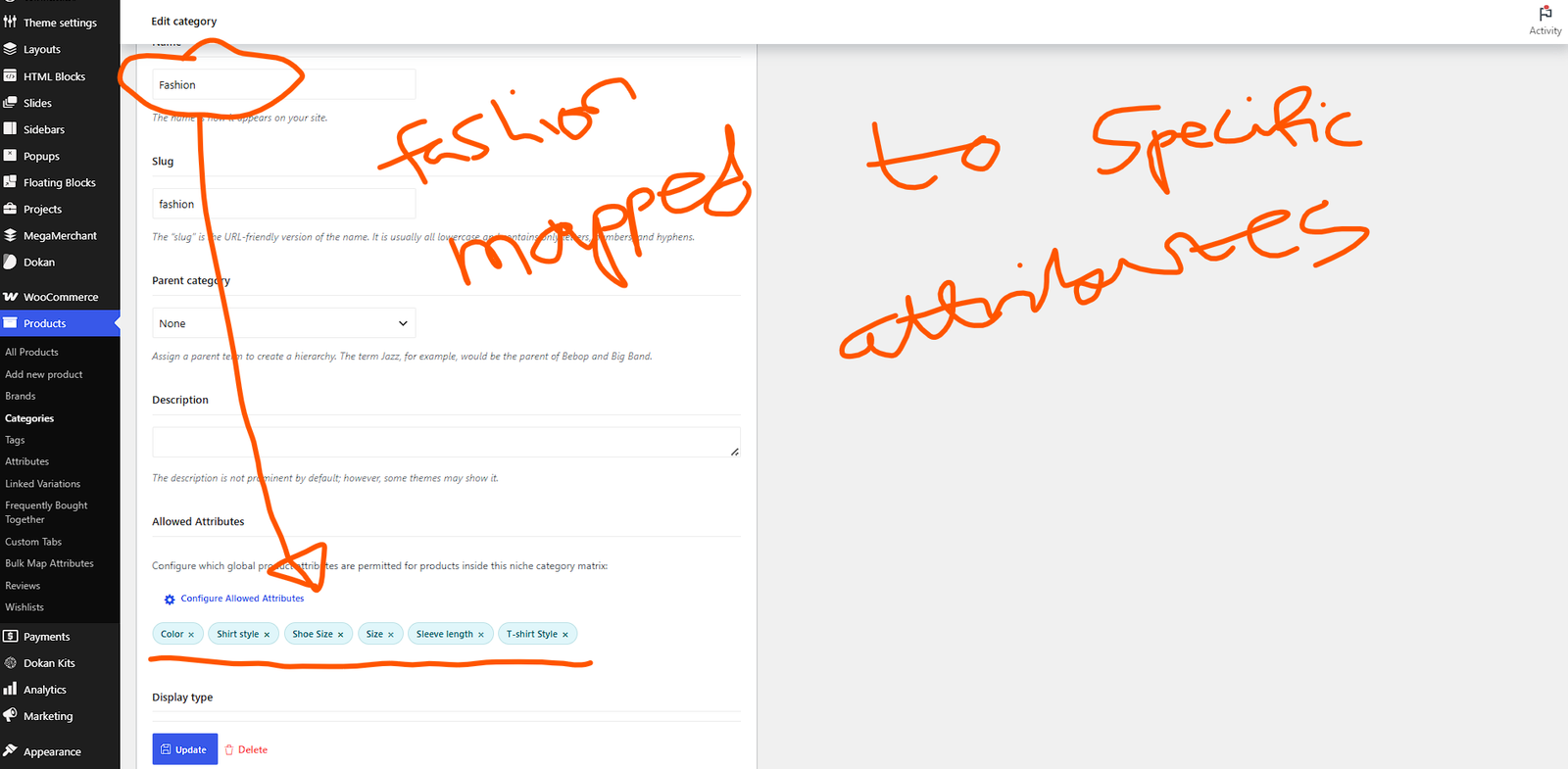
The plugin stores attribute rules as WordPress term meta, which is efficient, but at massive scale, you need to optimize:
Term Meta Indexing: Ensure your database has proper indexes on the term meta table. If your hosting provider hasn’t optimized this, ask them to add an index on meta_key and term_id.
Query Caching: The plugin’s frontend filter queries run on every category page load. Implement object caching (Redis or Memcached) to cache the results of attribute filter lookups. Since category rules change infrequently, you can cache these queries for 12-24 hours safely.
Attribute Lookup Optimization: For marketplaces with 500+ attributes, the admin modal can become slow. Consider:
- Breaking attributes into groups (e.g., “Technical,” “Commercial,” “Compliance”)
- Implementing lazy loading in the modal so only visible tiles render initially
- Using virtual scrolling for the attribute grid
5. Enterprise Category Management Strategies
Running a marketplace with 50+ categories and multiple administrators requires governance. Without rules and workflows, your attribute system will degrade into chaos.
The Attribute Governance Framework
Establish a governance document that defines:
Roles and Responsibilities:
- Attribute Administrator: The person authorized to create, rename, or delete WooCommerce attributes
- Category Manager: The person who assigns attributes to categories using the plugin
- Vendor Success Manager: The person who trains vendors and audits listing quality
- SEO Manager: The person who ensures attributes align with search strategy
Change Management Process: Before adding, removing, or renaming an attribute, require:
- A business justification document
- Impact analysis (how many existing products are affected?)
- Vendor communication plan
- Rollback plan in case of issues
Attribute Taxonomy Design
Design your attribute taxonomy with enterprise principles:
Controlled Vocabularies: Don’t let vendors create custom attributes for common specifications. If “Deployment Type” is a global attribute, ensure all values are standardized (e.g., “Cloud-Based,” “Self-Hosted,” “Hybrid”). Use WooCommerce attribute terms to enforce this.
Attribute Groups: Organize attributes into logical groups for easier management:
- Technical: Programming Language, Framework, Database, API Version
- Commercial: License Type, Pricing Model, Trial Period, Refund Policy
- Compliance: Certifications, Security Standards, Data Residency
- Support: Response Time, Channels, Documentation Quality
Naming Conventions: Establish strict naming rules:
- Use Title Case for attribute labels: “Deployment Type” not “deployment type”
- Include units in labels when ambiguous: “API Rate Limit (Requests/Minute)” not just “API Rate Limit”
- Avoid abbreviations unless universally understood: “API” is fine; “SaaS” might confuse some customers
Bulk Configuration Workflows
For initial setup or major restructuring, manually configuring each category is impractical. Develop bulk workflows:
Spreadsheet-Based Configuration: Create a master spreadsheet with columns for:
- Category ID
- Category Name
- Parent Category
- Allowed Attributes (comma-separated)
Use a custom script or WP All Import to bulk-update term meta based on this spreadsheet. This is significantly faster than clicking through each category in the admin.
Template Categories: Create “template” categories with perfect attribute configurations. When adding new categories, clone the template and make minor adjustments. This ensures consistency and reduces setup time.
Quarterly Audits: Schedule quarterly attribute audits:
- Export all category configurations
- Compare against current product catalog (are there new product types that need new attributes?)
- Check for orphaned attributes (attributes assigned to categories with no active products)
- Review vendor feedback for missing attribute requests
- Update configurations and communicate changes
6. Integrating with Analytics and Business Intelligence, WooCommerce Attributes
Your attribute system generates valuable business data. Integrating it with analytics platforms unlocks strategic insights.
Attribute-Based Sales Analytics
Configure your analytics platform (Google Analytics 4, Mixpanel, or Amplitude) to track attribute interactions:
Event Tracking:
filter_applied→ Track which attributes customers filter by mostattribute_viewed→ Track which attributes customers expand or readproduct_comparison→ Track which attributes are compared most frequently
Dimension Segmentation: In your sales reports, segment by attribute values:
- “Products with ‘Free Trial’ attribute convert 35% better than those without in the same category”
- “Customers who filter by ‘API Access’ spend 22% more per order”
- “‘Cloud-Based’ attribute increases average order value by $45 in the analytics software category”
Vendor Performance Scoring
Use attribute completeness as a quality metric in vendor performance dashboards:
The Attribute Quality Score (AQS): Calculate a score for each vendor based on:
- Percentage of products with 100% of required attributes filled
- Percentage of products with attribute screenshots (for software products)
- Accuracy rate (how often attribute values match customer expectations, measured by returns and reviews)
- Speed of attribute updates when category rules change
Display this score in the vendor dashboard and use it to determine search ranking boosts, featured placement eligibility, and commission rate negotiations.
Predictive Inventory Insights
Combine attribute data with sales velocity to predict demand:
- “Products with ‘Team Size: 50+’ sell 3x faster than those with ‘Team Size: 1-10’ in the Project Management category”
- “Annual subscription models represent 60% of all software sales — ensure vendors offer this billing option”
Share these insights with vendors to help them optimize their offerings and reduce churn.
7. Multilingual and Multi-Regional Considerations, WooCommerce Attributes
Expanding into international markets requires adapting your attribute system for different languages, cultures, and regulatory environments.
Attribute Localization
When using multilingual plugins like WPML, Polylang, or Weglot:
Label Translation: Translate attribute labels to match local conventions:
- English: “Deployment Type”
- Spanish: “Tipo de Despliegue”
- French: “Type de Déploiement”
- German: “Bereitstellungstyp”
- Japanese: “デプロイメントタイプ”
Value Localization: Some attribute values need cultural adaptation:
- Date formats: “MM/DD/YYYY” for US, “DD/MM/YYYY” for Europe
- Currency: “USD” for North America, “EUR” for Europe, “JPY” for Japan
- Support hours: “9 AM – 5 PM EST” for US, “9:00 – 17:00 CET” for Europe
Regulatory Attributes: Different regions require different compliance attributes:
- EU: GDPR compliance, CE marking for software with hardware components
- US: SOC 2 certification, HIPAA compliance for healthcare software
- UK: UKCA marking post-Brexit
- Australia: ACMA compliance for telecommunications software
Create region-specific attribute sets and use the conditional system to show only relevant compliance attributes based on the vendor’s target region or the customer’s location.
Currency and Pricing Attributes
If your marketplace supports multi-currency, ensure pricing-related attributes adapt:
- “Price Range” filters should convert dynamically based on the customer’s selected currency
- “Subscription Cost” attributes should store the base currency and convert on display
- Avoid hardcoding currency symbols in attribute values
8. Security and Data Integrity, WooCommerce Attributes
Marketplaces handle sensitive vendor and customer data. Your attribute system must be secure and reliable.
Input Validation and Sanitization WooCommerce Attributes
The plugin handles sanitization automatically, but ensure your broader system follows best practices:
Vendor Input Validation:
- Limit attribute value lengths to prevent database bloat (e.g., max 255 characters)
- Strip HTML tags from attribute values unless specifically required
- Validate numerical attributes (e.g., “API Rate Limit” should only accept numbers)
- Use dropdown/select attributes instead of text fields for standardized values (e.g., “License Type” should be a select, not free text)
Admin Security:
- Only grant attribute configuration permissions to trusted administrators, WooCommerce Attributes
- Use role-based access control (RBAC) to ensure category managers can’t modify plugin settings or license information
- Log all attribute rule changes with timestamps and user IDs for audit trails
Data Backup and Recovery
Since attribute rules are stored as term meta, they’re included in standard WordPress backups. However, for enterprise peace of mind:
Version Control for Rules: If you make frequent changes, maintain a spreadsheet or JSON export of your attribute rules. Before major changes, export the current state so you can restore quickly if something goes wrong.
Staging Environment Testing: Never test attribute configuration changes directly on production. Use a staging environment that mirrors your production database. The plugin’s license system supports staging domains — contact support if you need assistance with staging activation.
9. Custom Development and API Integration WooCommerce Attributes
For marketplaces with unique requirements, the plugin provides hooks and filters for custom development. WooCommerce Attributes
Extending Attribute Functionality
Custom Attribute Types: If your marketplace requires attribute types beyond WooCommerce’s standard text, select, and global attributes, you can extend the plugin’s modal to support:
- Date pickers for “Release Date” or “Subscription End Date”
- File upload fields for “Documentation” or “Sample Code”
- Rich text editors for “Feature Descriptions” or “Changelog”
Dynamic Attribute Population: Connect your attribute system to external data sources:
- Pull programming language versions from GitHub API
- Sync compliance certifications from certification body databases, WooCommerce Attributes
- Update pricing tiers from your billing platform
Integration with External Platforms WooCommerce Attributes
CRM Integration: Pass attribute data to your CRM (HubSpot, Salesforce, Pipedrive) to enrich lead profiles:
- A customer who filters by “Enterprise Plan” and “SOC 2 Compliance” is a high-value lead
- Trigger automated email sequences based on attribute interactions
Billing Platform Integration: Connect attributes to your subscription billing system (Stripe, Paddle, FastSpring):
- “License Type: Annual” → Create annual subscription in billing platform
- “Team Size: 50+” → Apply volume pricing tier automatically
- “Trial Period: 14 Days” → Configure trial length in billing platform
Help Desk Integration: Feed attribute data into your support system (Zendesk, Freshdesk, Intercom):
- When a customer submits a ticket, auto-populate their purchased product’s attributes
- Route tickets based on “Support Level” attribute (“Premium Support” → priority queue)
10. Future-Proofing Your Marketplace, WooCommerce Attributes
Technology evolves rapidly. Build your attribute system to adapt.
AI and Machine Learning Integration WooCommerce Attributes
Smart Attribute Suggestions: Use AI to suggest attributes for new products based on product descriptions:
- Vendor uploads a product description → AI extracts key features → Suggests relevant attributes
- Reduces vendor onboarding time and improves attribute completeness
Predictive Filtering: Use machine learning to reorder filters based on customer behavior:
- If 80% of customers filter by “Integration: Slack” first, move that filter to the top
- Dynamically hide filters that are never used in a given category
Conversational Search: Prepare for voice and chat-based search interfaces:
- “Show me cloud-based CRMs with API access under $50/month”
- Your attribute system must support natural language query parsing
Blockchain and Decentralization WooCommerce Attributes
Immutable Attribute Records: For high-stakes compliance attributes (security certifications, open-source licenses), consider blockchain verification:
- Store SHA-256 hashes of certification documents on a blockchain
- Customers can verify attribute authenticity without trusting the vendor
Decentralized Identity: Support decentralized identity standards for vendor verification:
- Vendor’s “Verified Developer” attribute linked to a decentralized identity credential
- Reduces fraud and increases customer trust
Sustainability and ESG Compliance WooCommerce Attributes
Carbon Footprint Attributes: As environmental regulations tighten, track and display:
- “Data Center Location” → affects carbon footprint calculations
- “Energy Source” → “100% Renewable” vs. “Mixed Grid”
- “Code Efficiency Score” → optimized code uses less server energy
Ethical Sourcing Attributes: For open-source software:
- “License: OSI-Approved” → ensures compliance with open-source standards
- “Contributor Diversity Score” → signals healthy, inclusive project
- “Security Audit: Passed” → independent security review completed
Conclusion: Building an Attribute-Driven Competitive Advantage WooCommerce Attributes
Dokan Conditional Category Attributes is more than a plugin — it’s an infrastructure investment that compounds in value over time. Every attribute you configure, every vendor you train, and every SEO enhancement you implement builds a moat around your marketplace that competitors without structured data cannot easily cross.
The strategies in this guide span from immediate tactical wins (better attribute labels, mobile filter optimization) to long-term strategic positioning (AI readiness, blockchain verification, ESG compliance). You don’t need to implement everything at once. Start with the fundamentals:
This Week: Audit your current attribute taxonomy and fix inconsistencies
This Month: Implement structured data markup and optimize your category page meta descriptions
This Quarter: Launch vendor training programs and establish attribute governance
This Year: Integrate analytics, explore AI-powered search, and prepare for international expansion
Your marketplace’s success depends on the quality of the shopping experience you deliver. When customers can find exactly what they want in three clicks, when vendors can list products in half the time, and when search engines understand your catalog with crystal clarity, you don’t just compete — you lead.
The attribute system is your foundation. Build it strong, manage it wisely, and let it power your marketplace to the next level.
WooCommerce Attributes, Ready to implement these advanced strategies? Review your current setup against the benchmarks in this guide, prioritize your highest-impact opportunities, and start building the attribute-driven marketplace of the future today.
Note: Digital products mentioned in this page are example use of what we sell a digital software (Dokan Conditional Category Attribute)


I like the emphasis on treating attributes as more than simple filters by connecting them to SEO structure and the overall shopping experience. One thing that would be interesting to explore further is how to balance detailed attribute pages with avoiding thin or duplicate content, especially on larger marketplaces. That seems like an important consideration for maintaining both usability and search visibility.