



Home Tools
Dokan Conditional Attribute.
A WordPress Plugin,
lets you restrict woocommerce attributes per category in dokan vendor dashboard.
2026
Dokan Conditional Attributes new dimension for dokan efficiency
Note: Digital products mentioned in this website are examplary/example use of what we sell a digital software (Dokan conditional category attribute)
____Simply Links specific attributes to specific Product Category____
(1) Category Attribute Mapping.
Restrict specific WooCommerce product attributes to designated categories. Vendors only see relevant attributes when creating products in assigned categories. For example, (Ram, processor, storage) restricted to Laptops. Note, vendors can decide wether to add or not any of the mapped attributes.
(2) Second Level Attribute restriction
Allows admins to force required attributes that must be added to a specific category, For example color, location, condition, etc. Note, Vendors must add to the product in creation.
(3) CSV Bulk Mapping
Import category-attribute assignments via CSV file. Rapidly configure large-scale mappings without manual entry for every category
(4) Attribute Templates for Vendors
Admins create reusable attribute templates per category. Vendors apply pre-configured attribute sets instantly without manual field-by-field setup.
(5) Vendor Request Attribute Feature
Allows vendors to submit requests for new attributes directly. Marketplace admins review and approve submissions through an organized workflow.
(6) Auto Add Vendor Request Attributes
Allows admins to automatically add requested attributes on approval to woocommerce product attributes
(7) Vendor Request Category Feature
Allows vendors to submit requests for new Categories directly. Marketplace admins review and approve submissions through an organized workflow.
Finally — Attribute Control That Thinks Like Your Vendors Do
Restrict WooCommerce product attributes dynamically based on category selection. Lifetime updates. Zero bloat.
Activation is instant, and the license system gives peace of mind. Your multi-vendor store will finally feels professional and vendor-friendly.
Conditional attributes for DOKAN Multivendor Ecommerce
- Category-smart attributes for serious marketplaces."
- "Stop vendors from mixing attributes."
- "The attribute gatekeeper your Dokan store was missing."
- "One mapping. Infinite enforcement."
GUIDELINES
USER MANUAL
Installation & Activation
- WordPress 5.8+
- WooCommerce 6.0+
- Dokan Multivendor Plugin (Lite or Pro)
- PHP 7.4+
- Upload the plugin ZIP via Plugins → Add New → Upload Plugin
- Click Activate
- Navigate to Products → Categories to begin mapping
- Go to Products → Categories
- Add New Category: The mapping interface appears directly below the standard category fields
- Edit Existing Category: Find the "Allowed Attributes" row in the edit form
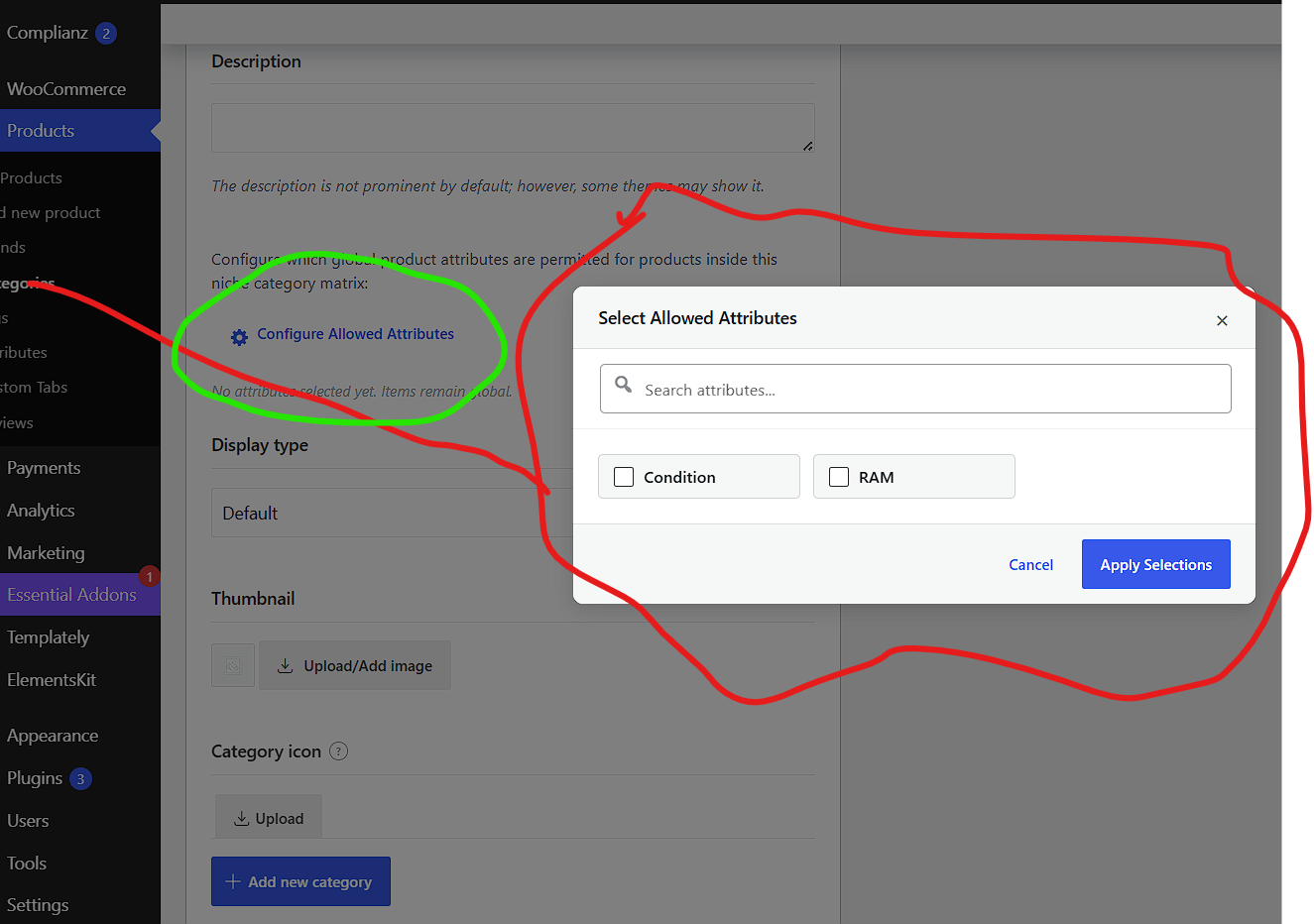
- Click "Configure Allowed Attributes" to open the selection modal
- Use the search bar at the top of the modal to quickly filter attributes
- Check/uncheck attributes — selected items highlight in blue with a visual tile state
- Click "Apply Selections" to confirm, or "Cancel" to revert changes
- Selected attributes appear as inline chips below the button — click the × to remove any attribute instantly
Pro Tip: If you leave a category unmapped, it will automatically inherit rules from its parent category. This makes managing large category trees effortless.
How It Works for Vendors
- Vendor selects a product category in the Dokan dashboard
- The "Add Attribute" dropdown automatically filters to show only allowed attributes
- If a vendor changes categories, previously selected but now-disallowed attributes are automatically removed from the form
- On save, the server validates that only permitted attributes remain attached to the product
Frontend Shop Experience
- Sidebar attribute filter widgets only show relevant options
- Empty or irrelevant filters are completely hidden
- Category pages load faster with fewer unnecessary query parameters
Advanced — Multi-Category Logic
- The plugin merges allowed attributes from all selected categories
- Vendors see the union of permitted attributes (never the intersection)
- Backend validation respects this union during save
PRO TIPS
FAQ (For Sales Page)
- No. Fully compatible with Dokan Pro.
- Existing products keep their current attributes, but vendors will see the updated rules when editing.
- The "Custom" attribute option remains always available in the dropdown, unrestricted.
- This is an annual subscription. You get lifetime updates while your subscription is active. Renewal is required yearly to continue receiving updates and support.
- No. The plugin loads a lightweight JSON map and uses native MutationObserver — no heavy polling or external API calls.
- Yes. depending on the tier purchased, single site license only for one website.
Sales Page Copy Blocks
The Problem (Pain Point)
The Solution
Perfect For:
- Fashion marketplaces (Size/Color per clothing category)
- Electronics hubs (Specs only for relevant device types)
- Bookstores (Format/Edition/Author attributes contextually)
- Handmade goods platforms (Material/Dimensions for physical items only)
- Any Dokan marketplace with more than 10 product categories
Why subcription Purchase?
- Pay once, we handle security.
- One Server management
- Compatibility Updates
Troubleshooting
| Issue | Solution |
|---|---|
| Attributes not filtering | Ensure attributes are created in Products → Attributes first, then mapped in Categories |
| Inheritance not working | Check that the parent category has attributes saved; empty parent rules won't cascade |
| Vendor still sees all attributes | Clear browser cache; the plugin caches the original dropdown state on page load |
| Sidebar still shows all filters | Verify you're viewing a product category archive (not a shop page or search result) |

