



TroubleShooting
Troubleshooting Guide — Dokan Conditional Category Attributes
Plugin Version: 2.0.0(Client) / 2.0.0 (Server)
Last Updated: June 2026
Developer: Logicblue
1. Diagnostic Methodology
- Disable all caching — page cache, object cache (Redis/Memcached), CDN edge caching
- Switch to a default WordPress theme — Storefront or Twenty Twenty-Four
- Deactivate all plugins except WooCommerce, Dokan, and Dokan Conditional Category Attributes
- Enable WordPress debug logging:
php
define('WP_DEBUG', true);
define('WP_DEBUG_LOG', true);
define('WP_DEBUG_DISPLAY', false);
2. Authorization (License) Issues
2.1 “Authorization Required” Lock Overlay
Table
| Cause | Check | Fix |
|---|---|---|
| Never activated | Go to Authorization Manager — status shows “Inactive” | Enter your DKN- token and click Activate Authorization |
| Expired | Status shows “Expired” — check expiry date | Purchase renewal via https://dokanconditionalattribute.com/pricing/ |
| Suspended | Status shows “Suspended” | Contact support — admin suspension requires manual approval |
| Server unreachable | “Sync failed” or “Stale” badge | Check server connectivity (see §2.4) |
| Local tampering | Integrity fingerprint mismatch | Click Sync Now to force server re-sync |
php
// Run in wp-admin > Appearance > Theme File Editor > functions.php (temporarily)
add_action('admin_init', function() {
    $status = get_('dokan_conditional_status');
    $token =('dokan_conditional auth_token');
    error_log("Auth Status: $status | " . substr($token, 0, 12) . );
});
2.2 “Invalid License Key” or “License Not Found”
- Verify key format — Must start with
DKN-followed by 4 groups of 4 alphanumeric chars (e.g.,DKN-ABCD-1234-EFGH-5678) - Check for extra spaces — Copy-paste can include leading/trailing spaces
- Verify purchase — Log into your logicblue account at
https://dokanconditionalattribute.com - Propagation delay — FastSpring-generated keys may take up to 5 minutes to propagate
- Case sensitivity — Keys are uppercase; lowercase input is auto-corrected by
sanitize_text_field()
Table
| HTTP Code | Meaning | Action |
|---|---|---|
| 200 + success:false | Key not in database | Verify purchase or contact support |
| 200 + success:true | Activation succeeded | Check local options for corruption |
| 401 | Invalid API secret | Plugin/server version mismatch — update plugin |
| 403 | Expired or suspended | Renew license or request admin approval |
| 404 | Endpoint not found | Check server URL configuration |
| 500 | Server error | Wait and retry; contact support if persistent |
2.3 “Maximum Site Limit Reached”
Table
| Tier | Max Sites | Counts As |
|---|---|---|
| Single | 1 | 1 production domain |
| Multi | 5 | 5 production domains |
| Business | Unlimited | No limit |
- Check Authorization Manager > Activated Domains — see which sites are active
- Deactivate unused sites from the old installations
- If old domain is inaccessible, contact support with your token and proof of ownership
- Upgrade to higher tier at
https://dokanconditionalattribute.com/pricing/
2.4 “Server Returned Invalid Response” / Sync Fails
bash
# Test HTTPS connectivity from your server# Expected: HTTP/2 200 with Cache-Control: no-store headers
# If timeout or SSL error, check firewall/CA bundle
Table
| Cause | Symptom | Fix |
|---|---|---|
| Firewall blocks outbound 443 | Connection timeout | Whitelist opequeglass.com port 443 outbound |
| Outdated CA bundle | SSL certificate verification failed | Update server CA certificates (ca-certificates package) |
| Proxy misconfiguration | Connection refused | Set WP_HTTP_PROXY_HOST and WP_HTTP_PROXY_PORT in wp-config.php |
allow_url_fopen disabled | wp_remote_post() fails | Enable in php.ini or use cURL alternative |
| DNS resolution failure | Host not found | Check DNS settings; try 8.8.8.8 or 1.1.1.1 |
php
// Add temporarily to wp-config.php for diagnostics
if ( defined('WP_DEBUG') && WP_DEBUG ) {
('http_request_args', function($args, $url) {
        if (strpos($url, 'opequeglass.com') !== false) {
            error_log("HTTP Request to $url;
        }
        return $args;
    }, 10, 2);
}
2.5 Authorization Reverts to Inactive After Activation
- Object cache corruption — Redis/Memcached may not persist WordPress Options API writes
- Fix: Flush object cache via hosting panel or
wp cache flush(WP-CLI) - Verify: Check
wp_optionstable fordokan_conditional_attrs_auth_status— should beactive
- Database permissions — DB user lacks
INSERT/UPDATEonwp_options- Fix: Grant privileges:
GRANT INSERT, UPDATE, DELETE ON wp_options TO 'db_user'@'localhost';
- Auto-load conflict — Some hosts disable
autoload=yesfor large options- Fix: Manually set autoload:
UPDATE wp_options SET autoload='yes' WHERE option_name LIKE 'dokan_conditional_attrs_%';
- Multisite option table confusion — Plugin uses
update_option()(notupdate_blog_option())- Fix: Ensure activation on correct site in network; use
wp-clito verify:wp option get dokan_conditional_attrs_auth_status
3. Category Attributes Not Appearing
3.1 Attributes Missing in Dokan Vendor Dashboard
plain
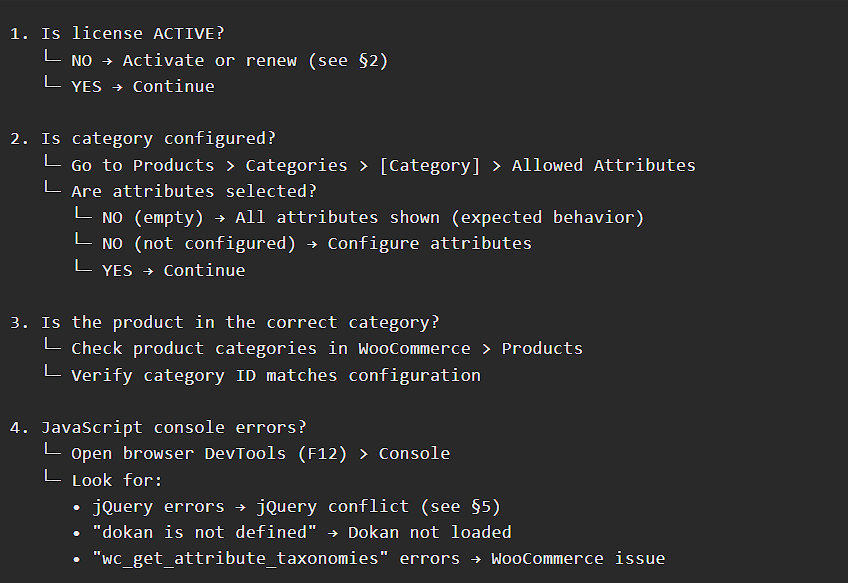
Important: The plugin does not use a window.X7M configuration object. The original troubleshooting guide referenced this fictional element. The actual plugin renders attributes server-side via wc_get_attribute_taxonomies() and stores selections in term meta (_allowed_attributes).
3.2 Category Inheritance Not Working
_allowed_attributes meta on the specific category only. It does not traverse parent categories automatically. If you need parent restrictions applied to children, you must:- Manually configure each child category, OR
- Use a custom snippet:
php
add_filter('market_allowed_', function($attrs, $term_id) {
    if (empty($attrs)) {
        $parent_id = wp_get_term_taxonomy_parent_id($term_id,  && !empty($parent_attrs)) {
                return $parent_attrs;
            }
    }
    return $attrs;
}, 10, 2);
sql
-- Check if child category has empty (but not null) configuration

WHERE meta_key = '_allowed_attributes'
  AND term_id = [CHILD_CATEGORY_ID];
— If meta_value = ‘a:0:{}’ (empty array), delete it to allow fallback:
DELETE FROM wp_termmeta
WHERE meta_key = ‘_allowed_attributes’
AND term_id = [CHILD_CATEGORY_ID];
3.3 Term Cache Issues
bash
# Flush term cache
wp cache flush
# Or programmatically
wp_cache_delete(‘last_changed’, ‘terms’);
php
// Exclude our meta from object caching
add_filter('wp_cache_add', function($result, $key, $data, $group) {
    if ($group === 'term_meta' && strpos($key,
    }
    return $result;
}, 10, 4);
4. Product Save Issues
4.1 Attributes Disappearing After Save
- Filters the attribute dropdown in the Dokan dashboard UI (frontend JavaScript)
- Blocks attribute configuration in category admin without active license
save_post or woocommerce_process_product_meta.Table
| Cause | Check | Fix |
|---|---|---|
| Dokan version conflict | Dokan Pro < 3.7 may have different attribute handling | Update Dokan to latest version |
| Theme overrides | Custom theme replaces dokan-product-edit.php | Use child theme or contact theme developer |
| WooCommerce HPOS | High-Performance Order Storage may affect attribute storage | Ensure WooCommerce 7.0+ with HPOS compatibility |
| Plugin conflict | Another attribute plugin interfering | Disable other attribute plugins one by one |
4.2 Serialization Corruption
sql
-- Check for corrupted serialized data
SELECT meta_value FROM wp_termmeta
WHERE
— Should be: a:2:{i:0;s:5:”color”;i:1;s:4:”size”;}
— If broken, delete and re-save category configuration
DELETE FROM wp_termmeta
WHERE meta_key = ‘_allowed_attributes’
AND term_id = [CATEGORY_ID];
5. JavaScript & jQuery Issues
5.1 Modal Not Opening
- jQuery loaded? Console:
typeof jQueryshould return"function" - jQuery version:
jQuery.fn.jqueryshould be1.12.4or higher (WordPress bundled) - Multiple jQuery instances: Check for
$conflicts - Console errors: Look for
TypeError: $ is not a function
php
// In your theme's functions.php — ensure only WordPress jQuery loads
add_action('wp_enqueue_scripts', function() {

    wp_enqueue_script('jquery');
}, 100);
5.2 Select2 Dropdown Not Updating
- Dokan’s own product attribute selector (different from this plugin)
- Another plugin modifying the category admin
5.3 Inline Chips Not Displaying
JavaScript
// In browser console on category edit page
jQuery('.market-inline-chips-wrapper').html();
// If empty, check if checkboxes are checked
jQuery(‘.market-hidden-cb:checked’).length;
// Should be > 0
6. Update Issues
6.1 No Update Available
- License status must be
ACTIVE - License key must be non-empty
- Domain must be in active sites list on server
- Server must be reachable
php
// Run in theme functions.php temporarily
add_action('admin_init', function() {
    $auth = dokan_auth_get_data(true); // Force refresh
$transient = get_site_transient(‘update_plugins’);
if (isset($transient->response[‘dokan-conditional-attrs/dokan-conditional-attrs.php’])) {
error_log(“Update available: “ . $transient->response[‘dokan-conditional-attrs/dokan-conditional-attrs.php’]->new_version);
} else {
error_log(“No update in transient”);
}
});
6.2 Update Download Fails
- Download URL expired (signed URLs have short TTL)
- Server returned 403 (domain not validated)
- SSL error on download server
7. Performance Issues
7.1 Slow Admin Pages
Table
| Cause | Check | Fix |
|---|---|---|
| Large domain list | Many active sites on multi-site license | Normal — pagination handled server-side |
| Slow server sync | dokan_auth_sync_from_server() takes >5s | Check server connectivity; increase cache duration |
| Many attributes | wc_get_attribute_taxonomies() returns hundreds | WooCommerce issue — limit attributes or use lazy loading |
php
// Increase cache duration to reduce server calls (default: 15 seconds)
7.2 Database Bloat
wp_options table growing with plugin options.sql
-- List all plugin options
SELECT option_name, LENGTH(option_value) as size
FROM wp_options

